A CRM import can contain the right people and companies yet leave sales with the wrong map of a buying group. The problem is relational: an employee may be linked to the wrong employer, an adviser may be labeled as a decision maker, or a manager relationship may point in the wrong direction. Checking email addresses and duplicate records does not establish that the connections between those records are correct.
This research addresses a specific delegation decision: what should a marketing or sales operations owner require before an assistant imports labeled relationships into HubSpot? The answer depends on the meaning and direction of the association, the evidence behind it, and the business processes that will consume it. An import acceptance message is only one part of that assessment.
Research approach
The analysis uses three HubSpot Knowledge Base articles checked on October 2, 2026. They cover import-file structure, association labels, and record associations. These are primary descriptions of the product. We use them to identify controls, then develop hypothetical examples to show where a syntactically acceptable relationship can remain commercially wrong.
No customer records were inspected. We did not test every subscription, import mode, object combination, or workflow behavior. Account owners should verify available functionality in their own portal. The proposed review method is an operating recommendation for small teams, not a claim that HubSpot endorses a particular sample size or approval structure.
Product facts that shape the review
HubSpot's import instructions require association labels to exist before import. A file can include a label column, and multiple labels can be separated with semicolons. The documented handling of paired labels differs between cross-object and same-object associations; in a same-object import, the associated-identifier column determines which record receives the supplied label. Custom association labels require an eligible Professional or Enterprise subscription. Import-file documentation
HubSpot also documents that association labels can be used in segments, workflows, and custom reports. That makes a label potentially consequential beyond the record display. Editing a relationship may change which records meet an existing business rule. Association-label documentation
The record-association guide distinguishes ordinary company relationships from primary-company status and describes permissions for managing associations. A contact can have relationships with multiple companies. The existence of a relationship alone does not identify which company should play the primary role. Record-association documentation
Separate identity evidence from relationship evidence
Suppose an assistant has verified that Dana's contact record and Harbor Studio's company record are each valid. That is identity evidence. It does not establish whether Dana works for Harbor, advises it, buys from it, or merely appeared alongside it in a conference program. The proposed relationship needs its own supporting observation.
A useful preparation sheet therefore contains the identifiers on both sides, the intended relationship in plain language, its source, the observation date, and an uncertainty note. For an employment association, a current company biography might support the connection. For a purchasing role, an internal account note may be more relevant. The evidence required should match the claim rather than defaulting to whichever field is easiest to populate.
Avoid inferring purchasing authority from seniority alone. A senior title can justify further research, but it does not prove the person approves this purchase. When the evidence supports only an unlabeled association, a more specific label can create false certainty. An exception queue is preferable to inventing a role to make the spreadsheet look complete.
Test direction with a sentence
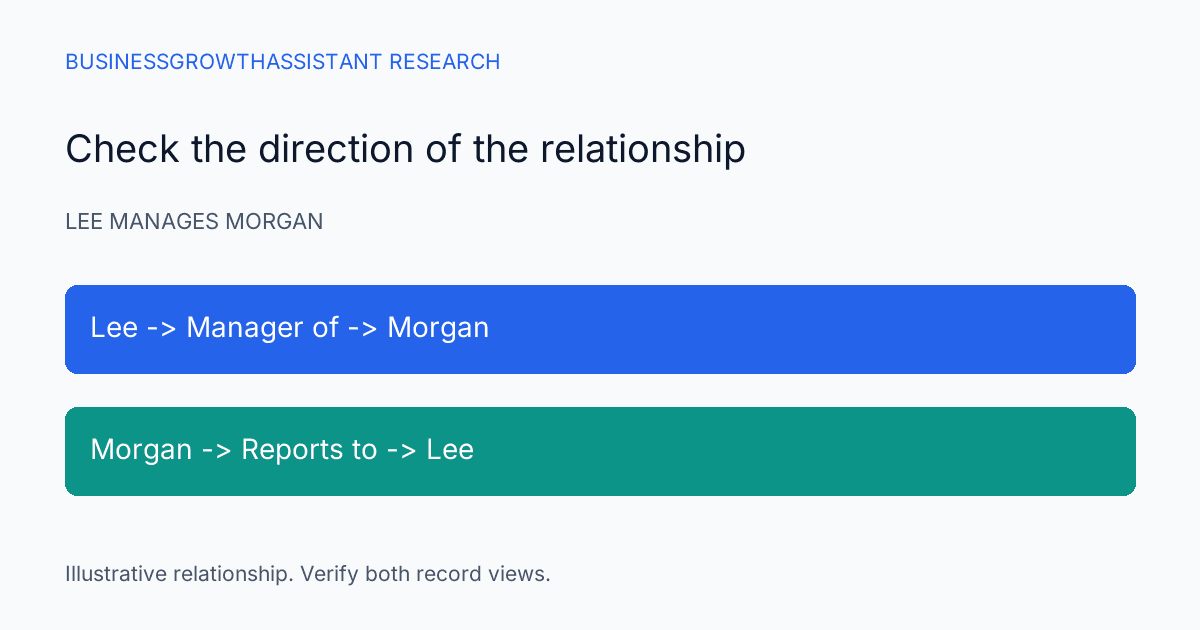
Paired relationships deserve an explicit reading test. Imagine two hypothetical contacts, Lee and Morgan. The source says Lee manages Morgan. A reviewer should be able to read the proposed import row aloud as that exact relationship and then inspect the inverse view on Morgan's record. If the displayed meaning becomes Morgan manages Lee, both contacts can be correct while the relationship is reversed.
Before preparing hundreds of rows, write a tiny test set with examples whose direction is unmistakable. Include an ordinary pair, a pair requiring the inverse label, and a relationship that should remain unlabeled. Verify the import's actual mapping for the selected objects rather than transferring assumptions from a previous file layout.
The same sentence method helps cross-object relationships. “Dana is an adviser to Harbor Studio” is clearer than a column called Role with the value Adviser and no indication of which record it describes. A reviewer should not need to reconstruct the importer's mental model from column order. Human-readable intent belongs beside the machine-readable identifiers during preparation.
Treat primary-company changes as a separate decision
A consultant can have several legitimate company connections. Assigning one as primary may influence how staff interpret the contact even when the other links remain intact. The importer should not promote the first company encountered simply because a spreadsheet requires an ordering.
The account owner should define what primary means for this workflow. It could mean the person's current employer, the company relevant to the active sales motion, or another documented business rule. That decision needs to be consistent with the account's existing configuration and reporting. Conflicting interpretations should be resolved before the import, especially where a contact already has a primary company.
For review, isolate rows that would affect primary-company status from rows that merely add a descriptive association. Record the current state and the proposed state. A business owner can then approve the consequential changes without having to scrutinize every unchanged contact field. This is a proposed risk-based review practice, not a claim that every portal implements identical dependencies.
Inspect consumers of the label
Before adding a new batch of labels, search the account's relevant segments, workflows, and reports for uses of that label. The important question is what membership or action may change after the association exists. A relationship used only for navigation has a different consequence from one that determines an outreach audience or sales assignment.
Consider a hypothetical campaign segment defined around billing contacts associated with selected companies. Incorrectly labeling an adviser as a billing contact could put an irrelevant person into the operational audience. Whether a message is actually sent depends on additional enrollment and consent rules; the label alone does not establish permission to contact someone. The review should examine those rules rather than assuming the import is an isolated data-cleaning task.
Where downstream behavior is uncertain, the assistant can document the affected assets and route the decision to the owner who understands them. Granting broader administrative access is not the automatic solution. The objective is to establish the effect of the proposed relationships using the least access needed for the work.
Reconcile edges as well as record counts
A before-and-after comparison should count intended relationships, not just imported contacts. Suppose a file contains 80 existing contacts and proposes 120 company associations because some people have more than one legitimate connection. A summary showing 80 contacts processed does not answer whether all 120 intended relationships were created with the right labels.
Create a comparison keyed by both record identifiers and the relationship type. Classify each intended connection as present with the intended meaning, missing, reversed, or unexpected. Include a review of previously existing relationships so the result does not hide an accidental change behind a correct total. A total of 120 can still contain 10 wrong edges and 10 missing ones.
If a correction is required, preserve the faulty import file and the observed after-state. Repair the identified relationships according to the product's supported controls. Do not assume that deleting an import automatically restores every prior association or downstream action. Recovery needs a documented target state, particularly if other users have edited the records since the import.
Where this fits in delegated CRM upkeep
Routine research, identifier preparation, evidence collection, and relationship reconciliation can fit a CRM upkeep assignment. Defining the organization's relationship vocabulary and authorizing consequential changes should remain with the appropriate business owner. Clear authority lets an assistant handle repeatable work without making unsupported commercial judgments.
This analysis complements the CRM handoff completeness research. Field completeness asks whether required information exists. Relationship review asks whether two valid records are connected for a supported reason. Both matter, but a high completion percentage cannot substitute for a correct buying-group map.
Limits and decision standard
The procedure cannot establish private relationships that the available evidence does not reveal. Public biographies can be stale, internal notes can conflict, and an accurate relationship may change after review. Record the evidence date and make uncertainty visible rather than describing an imported label as permanent truth.
A batch is ready when the identifiers, relationship meaning, direction, and consequential consumers have been checked to the level the owner requires. The goal is not the largest possible number of labels. It is a CRM whose connections help the next person understand the account without needing to reverse an avoidable import mistake.
Sources
- HubSpot Knowledge Base, Format import files, checked October 2, 2026.
- HubSpot Knowledge Base, Create and use association labels, checked October 2, 2026.
- HubSpot Knowledge Base, Associate records, checked October 2, 2026.
Sources
- HubSpot Knowledge Base, Format import files, checked October 2, 2026: https://knowledge.hubspot.com/import-and-export/set-up-your-import-file
- HubSpot Knowledge Base, Create and use association labels, checked October 2, 2026: https://knowledge.hubspot.com/object-settings/create-and-use-association-labels
- HubSpot Knowledge Base, Associate records, checked October 2, 2026: https://knowledge.hubspot.com/records/associate-records