An email campaign's reported clicks can fall because recipients changed their behavior, because the audience changed, or because the report now excludes activity that it previously counted. Those explanations imply different actions. Rewriting the offer may be sensible after a genuine engagement decline. It is a poor first response to a comparison whose measurement basis changed between exports.
For a lean marketing team, bot filtering creates a practical handoff question: how should the person preparing the email report explain a break in the click trend? This research proposes a report-reconciliation method that starts with the setting and ends with a decision about the campaign. It does not treat a filtered metric as a direct count of qualified buyers.
Scope and evidence
Two Mailchimp Help articles were checked on October 2, 2026: the guide to bot activity and filtering, and the click-tracking troubleshooting guide. They provide first-party descriptions of the reporting feature and reasons click counts can differ. Neither source gives us a customer's bot rate, the accuracy of every individual classification, or a causal estimate of campaign performance.
The numerical examples are constructed to explain the decision problem. They are not industry benchmarks or results from BusinessGrowthAssistant clients. The reconciliation procedure is our analysis for delegated campaign operations. It should be adapted to the reporting tools, exports, permissions, and outcome records the business actually uses.
What the platform documentation establishes
Mailchimp describes bot activity as non-human interactions, including security scans and link previews, that can inflate engagement. Its filtering identifies most such activity and hides it in reporting without deleting the underlying data. The setting applies across account reporting rather than being independently set for each report. The documentation also gives different historical availability dates for filtered opens, SMS clicks, and email clicks. Bot-filtering guide
The troubleshooting guide explains that security filters can follow links before delivery. It also describes a separate discrepancy: Mailchimp's own link checks may be registered by an outside tracker without appearing as equivalent tracked campaign clicks in Mailchimp. These are reasons two click reports can diverge, not proof of the cause of any particular divergence. Click-tracking troubleshooting
Establish which number changed
Start with the metric label. Unique clicks, total clicks, click rate, and clicks per unique open answer different questions. A report that silently moves between them can manufacture a trend break even when the filtering state is unchanged. Record the actual numerator and denominator used in the comparison, along with the campaign, audience, report time, and filtering setting.
Next, distinguish an old exported file from a newly viewed historical report. A saved spreadsheet is a snapshot. The current interface can reflect the current reporting basis. If the spreadsheet from last month and today's dashboard use different treatments of bot activity, aligning the campaign dates alone will not make them comparable.
The assistant should preserve the old export and label it rather than overwriting it. The original file may explain why a manager made an earlier decision. A reconciled version can sit alongside it with a note stating why its values differ. This creates a useful record without pretending the earlier presentation used information or settings that were not present at the time.
A worked example of an apparent decline
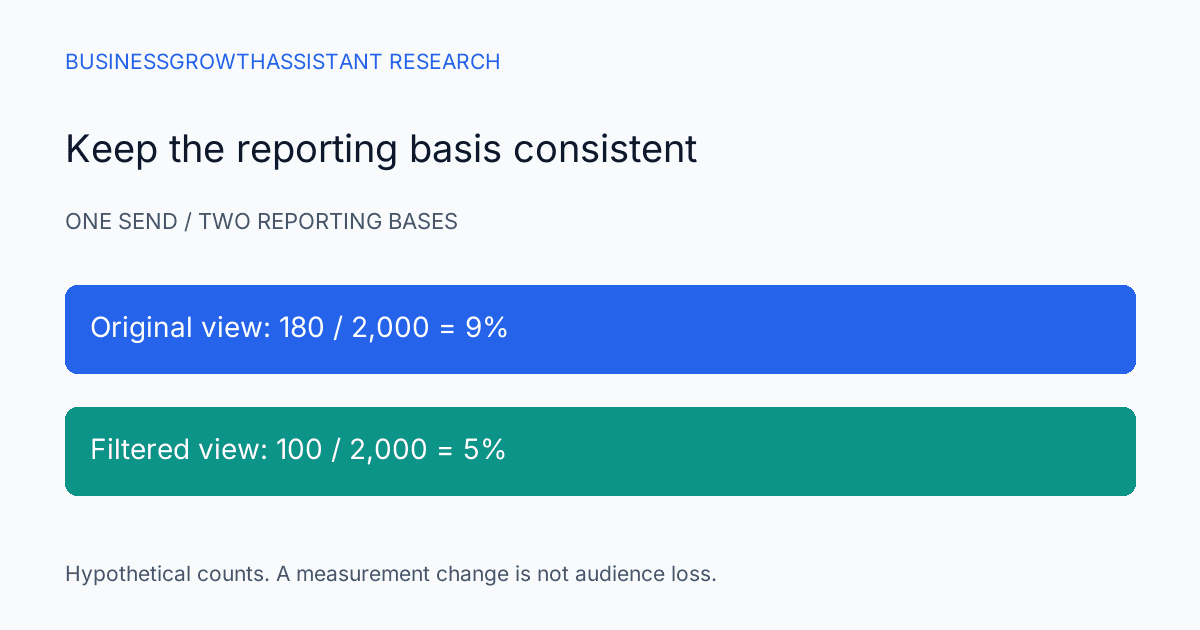
Suppose a hypothetical campaign reached 2,000 delivered messages and its original report showed 180 unique clickers. That produces a nine percent click rate for the example's chosen denominator. A later report on the same send, using a different filtering basis, shows 100 unique clickers. The comparable calculation is now five percent.
The four-percentage-point difference does not establish that 80 people lost interest. It describes a difference between reporting treatments of the same send. Nor does the example prove that exactly 80 contacts were bots in a real account. The numbers merely demonstrate why an analyst must inspect the basis before attributing a metric change to copy, timing, or audience fatigue.
Now consider a second campaign with a filtered click rate of six percent. Comparing six percent with the older unfiltered nine percent suggests decline; comparing six with the restated five suggests improvement. Neither comparison alone establishes the cause of performance. Audience composition, delivery, offer, timing, and sample size still need examination. The first task is to avoid mixing definitions before doing that analysis.
Rebuild only the comparison the decision needs
A full historical reconstruction is not always necessary. If the owner is deciding between two recent campaign variants, begin with those sends and ensure both use the same available filtering basis. If the question is an annual trend, historical availability becomes more important. Periods that cannot be reconstructed consistently should be labeled as a break in the series.
Prepare a small reconciliation table with the original value, current value, extraction timestamps, metric definitions, and setting evidence. Add a reason field that distinguishes observed setting differences from unresolved causes. “Filtering state differs” is a supportable observation when recorded. “All missing clicks were fake” is a much stronger claim that the aggregate reports may not justify.
Where exports or integrations feed a dashboard, inspect their definitions separately. A visually similar metric name does not establish that the connector returns the same treatment as the current interface. If the connector's behavior is undocumented or cannot be verified with an authorized sample, describe the comparison as unresolved and identify the owner who can inspect it.
Do not make one click carry the whole buying signal
A click can be useful evidence of interaction without being sufficient evidence for sales outreach. An operational workflow that treats any click as a purchase-ready lead risks overinterpreting both automated activity and ordinary curiosity. Before changing such a workflow, the team should review what other evidence it requires and who is authorized to alter that rule.
For a hypothetical consultation campaign, the owner might compare engagement with completed request forms, meaningful replies, or booked meetings. Those outcomes have their own limitations: a reply may be an absence message, a form may be spam, and a booking may cancel. The point is to make the intended business outcome explicit, not to declare another metric perfectly clean.
Use aggregate comparisons where individual matching is unnecessary. When record-level reconciliation is authorized and needed, carry only the fields required for the question. An assistant should not export an entire contact database just to explain a weekly click-rate change. The scope of the analysis should match the decision and the account's access rules.
Run a focused investigation before changing the campaign
A practical investigation begins with the affected campaigns and the earliest point at which the reported series diverged. Check whether a filtering or metric-definition change coincides with that break. Then inspect delivery counts, audience selection, links, and downstream outcomes. This order prevents creative changes from being used to repair a reporting mismatch.
If the evidence supports a measurement break, explain the comparable result and keep the campaign recommendation separate. If comparable engagement still declines, investigate the offer and audience on their merits. If the result remains ambiguous, propose a limited next comparison with a stable measurement basis rather than a confident diagnosis from one noisy metric.
Do not repeatedly toggle an account-wide setting for ad hoc screenshots while other people are reporting. Coordinate any authorized change, record its time, and notify the reporting owner through the business's established process. The product setting is part of a shared reporting environment, so the work should account for other reports that may be viewed during the investigation.
Handoff and limits
The recurring work fits email campaign administration: record the reporting basis, maintain comparable exports, inspect links, and route unresolved discrepancies. The related email production research addresses the effort around campaign execution. Here the narrower concern is whether engagement evidence supports the decision being made after the send.
The method cannot identify every automated interaction or establish the intent behind every remaining click. Vendor classification can evolve, account data may be incomplete, and historical snapshots may lack the setting evidence needed for exact reconstruction. Those are reasons to state the limit of a comparison, not to invent a universal correction factor.
A useful final report says what changed, which periods can be compared, and what business evidence remains. Once the measurement basis is stable, campaign performance can be discussed on firmer ground. Until then, a lower click count is an observation to reconcile, not an automatic instruction to rewrite the email.
Sources
- Mailchimp Help, About Bot Activity and Bot Filtering, checked October 2, 2026.
- Mailchimp Help, Troubleshooting Click Tracking, checked October 2, 2026.
Sources
- Mailchimp Help, About Bot Activity and Bot Filtering, checked October 2, 2026: https://mailchimp.com/help/about-bot-activity/
- Mailchimp Help, Troubleshooting Click Tracking, checked October 2, 2026: https://mailchimp.com/help/troubleshooting-click-tracking/