A campaign's average cost per lead can change even when the cost within each traffic segment stays the same. If more of the week's spend moves toward the more expensive segment, the combined number rises. A report that stops at the average can send a marketing owner looking for a creative or landing-page problem that the available evidence has not established.
For Google Ads reporting, one useful first split is network. The objective is not to decide in advance that one network is good and another is bad. It is to identify whether the mix changed, whether the outcome definition is comparable, and what the manager would need to know before changing campaign settings.
Begin with the exact campaign and metric
Write down the campaign, date range, conversion action set, currency, and extraction time. Decide whether the report concerns clicks, leads, qualified leads, or purchases. A cost-per-conversion column can include actions that do not match the sales team's meaning of a lead, so resolve that definition before comparing segments.
Preserve the unsegmented totals. They are the control against which the breakdown will be reconciled. If the segmented export later appears to show more spend than the original campaign report, investigate the report layout or scope rather than accepting the larger number. Totals and detail rows can be mistakenly added together in a spreadsheet.
Apply the documented network split
Google documents a Network with search partners segment for comparing Google Search, search partners, and Display Network performance where applicable. The available segments depend on the table and reporting context. Use the feature supported by the campaign you are reviewing and retain the segment labels in the export. Google Ads segment guide
Do not rename every non-Google-Search row as low-quality traffic. The label identifies a reporting category, not a verdict on the customers it produced. Likewise, the absence of a segment in one export does not establish that the campaign never served there. Check the selected dates, campaign configuration, and report filters before drawing that conclusion.
Calculate rates from the underlying counts
Use spend divided by the relevant conversion count for each segment, then calculate the combined rate from combined spend and conversions. Do not average the two segment CPAs unless the weighting makes that operation appropriate. A simple average can give a small segment the same influence as a much larger one.
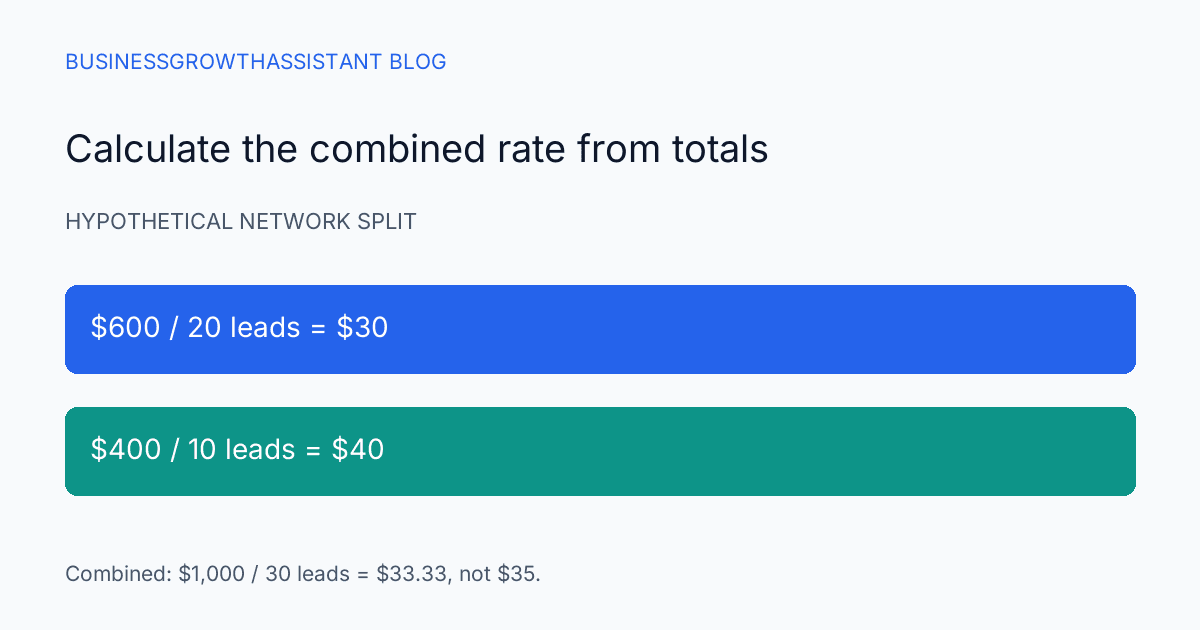
Consider a hypothetical week with $600 spent on one segment for 20 leads and $400 on another for 10 leads. The segment CPAs are $30 and $40. The combined CPA is $1,000 divided by 30, or about $33.33. Averaging $30 and $40 produces $35, which is not the campaign's cost per lead.
Now suppose the next week spends $300 for 10 leads in the first segment and $800 for 20 in the second. Each segment's CPA is unchanged, but the combined CPA rises to about $36.67. The mix shifted toward the more expensive segment. That explains the arithmetic movement without proving why the spend distribution changed or whether the result is commercially worse.
Inspect lead quality without inventing attribution
If the business has reliable CRM outcomes linked to advertising records, compare the same outcome across segments. Keep the matching method explicit. Some leads may not have a trustworthy segment assignment, and those should remain unknown rather than being placed in whichever category makes the report balance.
A lower platform CPA can coexist with a higher cost per qualified opportunity. It can also produce more valuable customers despite a lower qualification rate. The business decision depends on the actual objective and the completeness of later outcome data. Report counts alongside rates so a handful of outcomes does not look like a stable pattern.
Do not judge a new cohort against an older cohort that has had much more time to progress through sales. If one segment's leads tend to require longer follow-up, a same-calendar-week sales snapshot may be unfair. Identify the age of the leads and the stage being compared before recommending a change.
Explain mix and performance separately
A useful report distinguishes a shift in allocation from a change within a segment. Show the share of spend, the outcome count, and the rate for each period. Then write a sentence describing what the arithmetic supports. For example, the blended CPA rose while segment CPAs stayed stable and the higher-cost segment received a larger spend share.
That sentence is deliberately narrower than saying the platform sent worse traffic. It leaves room for the next investigation: campaign settings, query mix, bidding behavior, demand, or other changes. The assistant can collect those facts without claiming that a two-row export establishes causation.
If both the mix and segment rates changed, report both. There is no need to force one explanation when the evidence contains several movements. A small team benefits more from a clear decomposition than from a confident story that cannot be reproduced from the numbers.
Keep recommendations inside the assigned authority
The person preparing the report should know whether they may change network settings or only recommend a review. A request to explain performance does not automatically authorize campaign edits. Record the proposed action, its rationale, and the business owner who decides whether the tradeoff is acceptable.
If a change is authorized, preserve the old configuration and the time of the change. Define how the next comparison will account for other campaign edits. A simultaneous new offer, new landing page, and network change may be operationally necessary, but the resulting performance cannot cleanly isolate the effect of the network decision.
Deliver a report that supports a choice
A paid ads operations assistant can prepare the network split, reconcile totals, and maintain the decision record. The related paid-ad verification research helps establish whether the measured outcome is trustworthy before the team compares its cost.
The completed review should identify the exact scope, show reconciled totals, explain the weighting, and distinguish observed changes from possible causes. It may end with a recommendation to investigate further rather than an immediate setting change. That is still useful work when it prevents a campaign decision from being driven by a misleading average.
Sources
- Google Ads Help, Use segments in your tables, checked October 2, 2026.